What is Guide-ID?
Guide-ID is a complete audio tour system for museums, heritage sites, zoos, and visitor attractions. It combines purpose-built hardware with an online platform to deliver multilingual audio experiences.
How it works
Section titled “How it works”A Guide-ID audio tour consists of three parts:
-
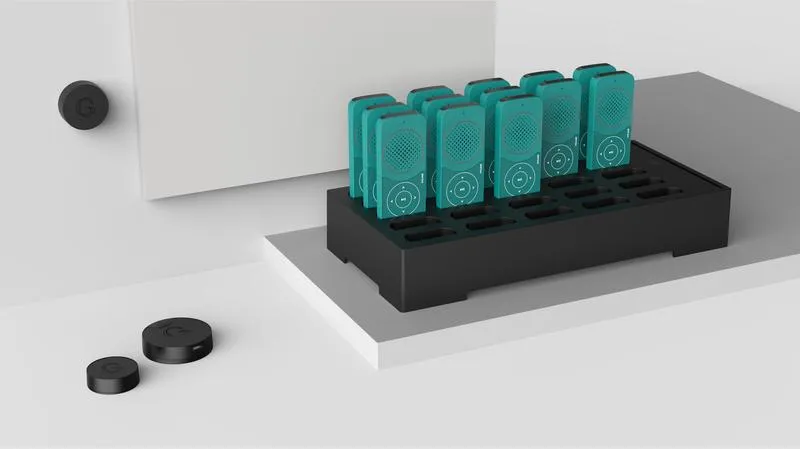
Podcatcher Pro — a handheld audio device that visitors carry. It plays audio clips in the visitor’s language, triggered by beacons placed throughout the venue.
-
Beacons — small wireless transmitters installed at points of interest. When a visitor with a Podcatcher Pro approaches a beacon, the correct audio clip plays automatically.
-
Platform — the online management system at platform.guide-id.com where you create tours, manage content, monitor hardware, and view visitor analytics.
The visitor experience
Section titled “The visitor experience”- The visitor picks up a Podcatcher Pro at the entrance and selects their language.
- As they walk through the venue, beacons trigger audio clips automatically — no buttons to press, no numbers to enter.
- The Podcatcher Pro can also play audio via the built-in speaker, a 3.5 mm headphone jack, or paired Bluetooth headphones.
- At the end of the visit, the visitor returns the Podcatcher Pro to the Basecamp for charging and content sync.
Key components
Section titled “Key components”| Component | What it does |
|---|---|
| Podcatcher Pro | Handheld audio guide device |
| Basecamp | Charging and syncing station (up to 25 devices) |
| Beacon Pro | Rechargeable beacon with Bluetooth + UWB triggering |
| Beacon Lite | Battery-powered beacon with Bluetooth triggering |
| Brainbox | Bridge device for AV-sync and interactive installations |
Triggering methods
Section titled “Triggering methods”Guide-ID supports two ways to trigger audio:
- Bluetooth scanning — the Podcatcher Pro scans for nearby Beacon Pro or Beacon Lite devices. Most common method.
- UWB (Ultra-Wideband) — automatic zone-based triggering with precise distance measurement. Available on Beacon Pro.
Getting started
Section titled “Getting started”If you’re new to Guide-ID, follow the onboarding steps:
- Account Setup and First Login — log in and configure your site
- Quick Start Guide — connect hardware and create your first tour
- Go Live Checklist — verify everything before launch
Related articles
Section titled “Related articles”- Getting Started with Guide-ID — step-by-step onboarding roadmap
- Guide-ID Features Overview — explore all available features
- Network Requirements — what your IT team needs to know