Beacon Pro Installation
The Beacon Pro is a versatile device that enhances audio tour experiences while maximizing visitor engagement.
Step 1: Unboxing
Section titled “Step 1: Unboxing”Unpack the Beacon Pro and activate it using the ON/OFF switch on the bottom.
Step 2: Charging
Section titled “Step 2: Charging”The battery provides up to 3 months of operation with regular use. Charge the device by connecting it to a power source via USB-C cable.
You can also:
- Use a powerbank for portable charging
- Permanently connect it to a power supply for continuous, low-maintenance operation
Step 3: Installation
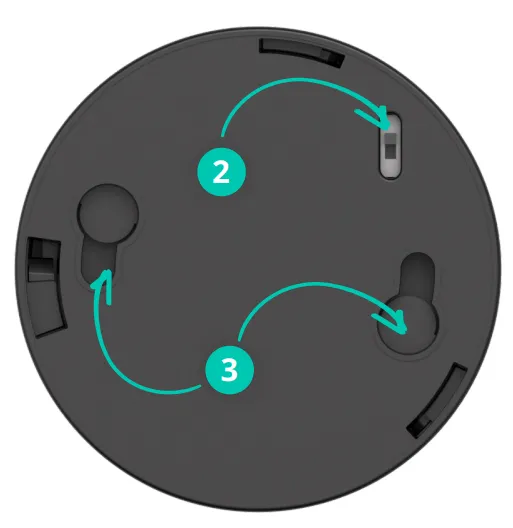
Section titled “Step 3: Installation”Mount the Beacon Pro at chest height. Avoid placing objects between the beacon and the visitor for optimal UWB ranging.
Step 4: Platform configuration
Section titled “Step 4: Platform configuration”Connect the Beacon Pro to relevant stops through the platform:
- Open Stop Settings
- Add a new beacon and select Beacon Pro
- Define the desired range
- Publish the changes
- Synchronize them to all Podcatcher Pro devices
The beacon automatically triggers audio content when visitors with a Podcatcher Pro enter the specified zone. For instance, a 2-meter radius creates a circular activation area.
Key features
Section titled “Key features”Automated triggering
Section titled “Automated triggering”Powered by UWB technology, it automatically plays audio content when a visitor enters.
Long battery life and power options
Section titled “Long battery life and power options”Operates on a single battery for up to 3 months, with USB-C charging or permanent power connection options.
User-friendly design
Section titled “User-friendly design”Visitors trigger content by scanning or entering designated zones. No complicated apps required.
Related articles
Section titled “Related articles”- What is a Beacon? — overview of beacon technology
- Beacon Pro Dimensions — size and weight specifications
- Battery Maintenance — keep your Beacon Pro charged