Missing Podcatchers
This guide addresses common questions about missing Podcatcher Pro devices and provides practical solutions for fleet management.
Understanding missing device alerts
Section titled “Understanding missing device alerts”Why devices are marked missing
Section titled “Why devices are marked missing”Podcatcher Pro units are flagged as missing when they have not synced with a Basecamp for over seven days. This threshold helps distinguish temporarily-used devices from genuinely lost equipment. Common causes include:
- Visitors taking devices home.
- Devices left in unusual locations.
- Units sent for repair.
- Equipment stored outside the Basecamp.
Notification timing
Section titled “Notification timing”You receive alerts one week after a device’s last sync, reducing false positives while ensuring timely notification for intervention.
Locating and managing missing devices
Section titled “Locating and managing missing devices”Finding missing devices
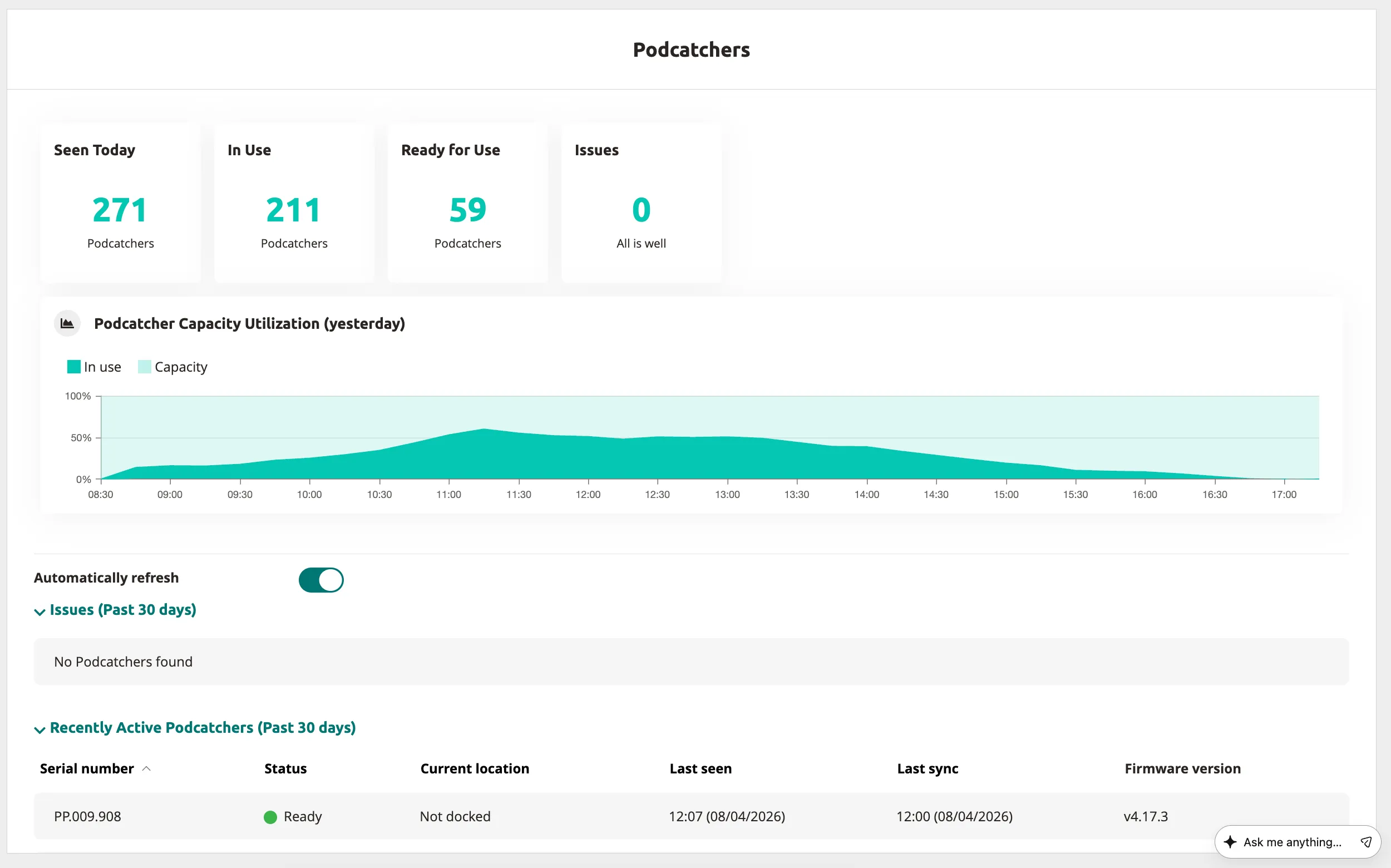
Section titled “Finding missing devices”Check the Podcatcher overview page in the Platform to view device status, last sync time, activity patterns, and battery levels.
Sync errors
Section titled “Sync errors”If a device is physically present but marked missing, contact support immediately — the unit likely has a communication issue preventing Basecamp syncing.

Resolution strategies
Section titled “Resolution strategies”- Devices returned for repair — Guide-ID automatically updates status when units enter the returns system.
- Devices found on premises — Return the Podcatcher to any active Basecamp for automatic syncing and status update.
- Genuinely lost devices — Order replacements through the Hardware Replacement page; replacement fees apply per service agreements.
Prevention strategies
Section titled “Prevention strategies”- Designated return stations — Establish clearly marked return points, ideally positioned before final visitor activities like gift shops.
- Inactivity alarms — Configure built-in alarms through Site Settings > Podcatcher with timing adjusted to visitor patterns.
- Beacon Pro exit system — Position Beacon Pro devices near exits to trigger audible alarms when Podcatchers scan them before leaving premises.
- System optimization — Review alarm beacon positioning to ensure coverage of all potential exit routes, including secondary and emergency exits.
Related articles
Section titled “Related articles”- Podcatcher Overview — manage your Podcatcher fleet
- Alarm — set up exit alarm zones
- Found a Lost Podcatcher? — return instructions for lost devices