Basecamp Network Issues
If your Basecamp does not come online, or Podcatcher Pro devices stop receiving new tour content, work through these checks.
1. Check the physical connection
Section titled “1. Check the physical connection”- Ethernet (recommended): make sure the cable is firmly seated in the Basecamp’s RJ-45 port and in your network port, and that the port’s link light is on.
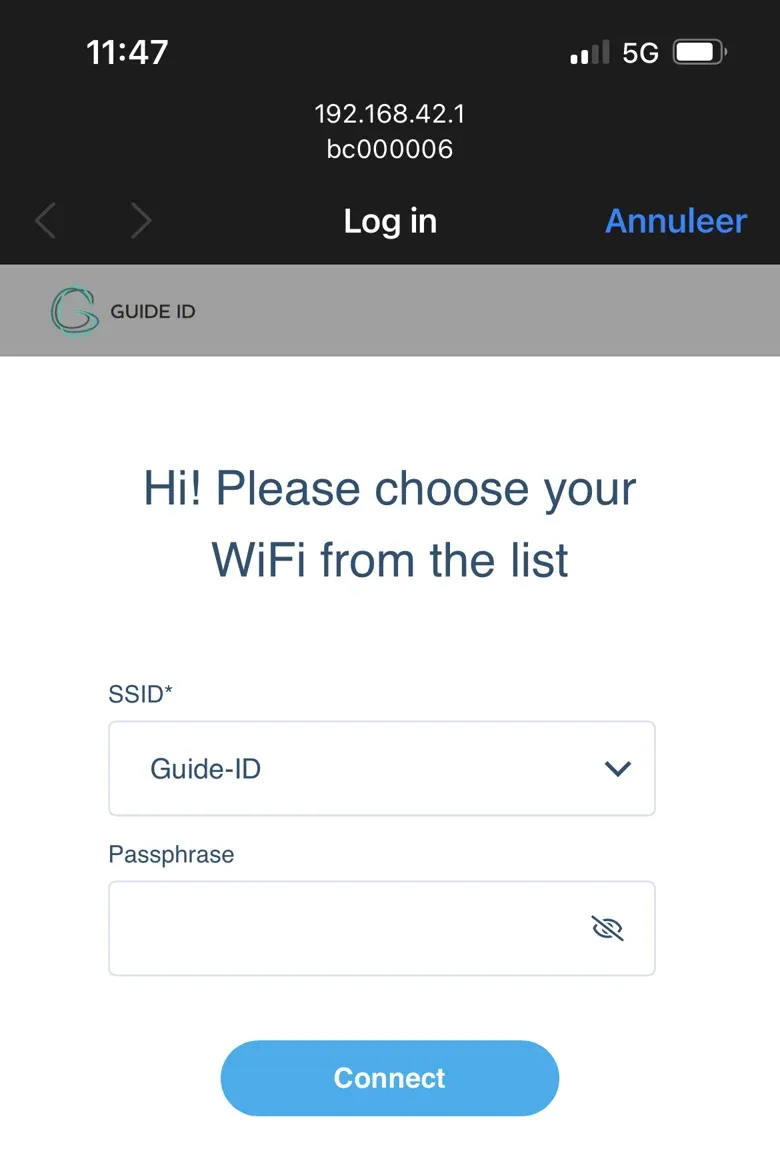
- Wi-Fi: without an Ethernet link the Basecamp starts its own hotspot, named after its serial number (e.g.
bc000123), passwordpodcatcher. Only 2.4 GHz networks are supported.
.DLm2h_mT_ZxgyT9.webp)
Once connected to the hotspot, the configuration page opens automatically; if not, browse to http://192.168.42.1. Select your venue’s network under Select SSID, enter the Passphrase and click Connect.
2. Read the Connection LED
Section titled “2. Read the Connection LED”The third LED on the Basecamp shows the connection state:
- Green, steady — connected to Guide-ID
- Green, one flash per second — retrieving configuration, wait up to two minutes
- Orange, blinking — hotspot active, Wi-Fi not configured yet
- Orange, steady — internet works, but Guide-ID cannot be reached (firewall)
- Red, blinking — no IP address received from DHCP
- Red, 2 flashes — captive portal (login page) detected; 3 / 4 flashes — no gateway / no DNS
See LED Indication Basecamp for the full table.
3. Verify the network requirements
Section titled “3. Verify the network requirements”The Basecamp needs outbound HTTPS (TCP 443) to:
api.guide-id.com Guide-ID sync servicessyncboxdebug.guideid.com remote diagnostics — only when enabled by Guide-ID supportconnectivitycheck.gstatic.com internet and captive-portal checkIt also needs DHCP (IPv4 with gateway and DNS) and, preferably, NTP (UDP 123). Captive portals, such as hotel or guest networks with a browser login page, are not supported.
For the complete list, see Network Requirements.
4. Check the status in the Platform
Section titled “4. Check the status in the Platform”- Log in to the Platform
- Go to Hardware → Basecamps
- Check whether the Basecamp shows Online or Offline
The status is based on the Basecamp’s last report to Guide-ID and can take up to 35 minutes to update. If it stays Offline while the Connection LED is steady green, wait for that period before power-cycling.
Still having issues?
Section titled “Still having issues?”Contact helpdesk@guide-id.com with the Basecamp serial number, the Connection LED pattern and a description of your network (wired or Wi-Fi, firewall, proxy).
Related articles
Section titled “Related articles”- Network Requirements — full connectivity prerequisites
- Basecamp Installation — setup guide including network connection
- LED Indication Basecamp — understand Basecamp status LEDs
- Hardware Management — monitor Basecamp online status