Troubleshooting
Beacon Not Detected
If a Podcatcher Pro does not react at a tour stop, work through these checks in order.
1. Check the Beacon battery
Section titled “1. Check the Beacon battery”- Beacon Lite runs on a CR2032 coin cell for up to two years. When the Platform shows the battery as low, replace it — see Replacing Batteries.
- Beacon Pro has a rechargeable battery (up to three months per charge, fully charged in about three hours via USB-C). In the Platform, open Hardware → Beacons and look at the Battery column. The value is as recent as the last time a Podcatcher Pro passed the beacon (column Last triggered).
2. Check the distance
Section titled “2. Check the distance”The two beacon types trigger differently:
- Beacon Lite (Bluetooth) — the visitor has to hold the Podcatcher Pro close to the beacon: within about 15 cm. Walking past at a distance does nothing.
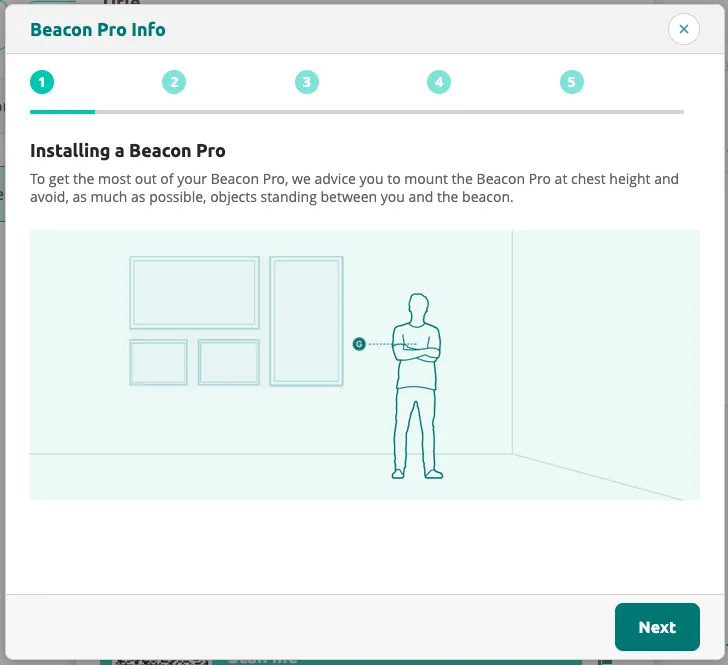
- Beacon Pro (UWB) — the Podcatcher Pro triggers as soon as it enters the Trigger distance set for that beacon in the Platform (from 15 cm to 10 m, default 3 m). Mount the Beacon Pro at chest height with a clear line of sight to the visitor.
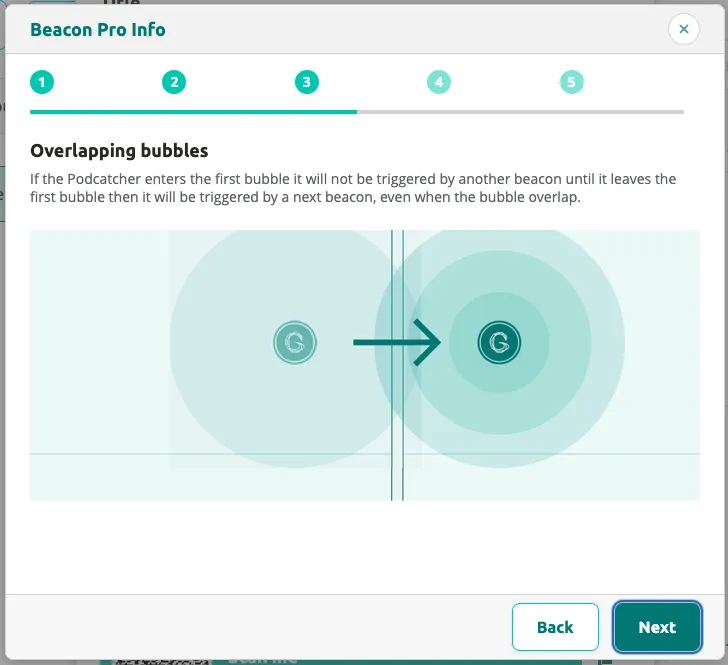
Overlapping Beacon Pro zones are handled in order: a Podcatcher Pro that is inside one zone is not triggered by the next beacon until it has left the first zone.
3. Verify the beacon in the Platform
Section titled “3. Verify the beacon in the Platform”- Log in to the Platform
- Go to Hardware → Beacons
- Find the beacon by its Beacon code — the code printed on the beacon itself (
BL.000.001for a Beacon Lite,BP.000.001for a Beacon Pro) - Check the Links to Stop(s) column: it must name the stop you expect. If it is empty, link the beacon in that stop’s settings — see Adding Beacons
4. Check the state of the Podcatcher Pro
Section titled “4. Check the state of the Podcatcher Pro”- Beacon scanning starts automatically every time the device is taken out of the Basecamp. There is no Bluetooth switch and no power button.
- An orange LED ring means the device is not ready: the battery is below the site’s threshold, or the last sync was incomplete or outdated. In that state it does not scan for beacons at all and the buttons only vibrate. Dock it in a Basecamp until the Podcatchers page shows status Ready.
- To restart a Podcatcher Pro, dock it and take it out again.
- After a trigger the device ignores beacons for about three seconds (one second once a tour is running). Wait a few seconds between tests.
5. Test with another beacon
Section titled “5. Test with another beacon”Swap the beacon with one that is known to work at another stop. If the second beacon triggers, the first beacon is the problem; if neither does, the Podcatcher Pro or the tour content is.
Still having issues?
Section titled “Still having issues?”Contact helpdesk@guide-id.com with the Beacon code, the Podcatcher Pro serial number and the tour name.
Related articles
Section titled “Related articles”- What is a Beacon? — understand beacon types and usage
- Replacing Batteries — battery replacement instructions
- Adding Beacons — assign beacons to tour stops
Was this article helpful?