Beacon Overview
The beacon overview provides visibility into your beacon status and enables adding new devices.
Beacon list organization
Section titled “Beacon list organization”The beacon list displays all linked beacons, organized by their assigned purpose into separate sections.
Stop beacons
Section titled “Stop beacons”Stop beacons show information about devices assigned to your tour stops. New beacons can be added via the Add new Beacon + button on this page or directly within a tour. Each beacon displays:
Beacon Code A unique identifier on the beacon’s back. The prefix indicates type:
- BL = Beacon Lite
- BP = Beacon Pro
- BW = Beacon Lite Waterproof
- ID = IDentifier
Links to Stop(s) Indicates which audio clip plays upon scan and the associated tour.
Language For tour start beacons, shows the initial tour language.
Last Triggered The most recent scan date and time registered in the system.
Battery Status Five-level indicator: Full, MostlyFull, Half, Low, Depleted
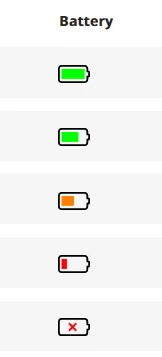
May also display “Connected to mains” (Beacon Pro charging) or “Unknown” (newly added beacons).
Actions Options to delete the beacon entirely or unlink it from assigned stops.
Alarms
Section titled “Alarms”The Alarms page displays Beacon Pro units functioning as alarms. New alarms can be added from this page with these fields:
Beacon Code Unique identifier found on the device. Only Beacon Pro units function as alarms.
Name Labels the location or differentiates between multiple alarms.
Trigger Distance Defines the area radius centered on the Beacon Pro from which the alarm activates.
Last Triggered Most recent scan registration date and time.
Battery Status Five-level indicator with the same options as stop beacons.
Actions Delete alarms using the trash button or edit the name and trigger distance.
Headphone connectors, group tours, and shared listening
Section titled “Headphone connectors, group tours, and shared listening”These pages list beacons enabling specific functionality:
- Headphone Connector Beacons — Enable Bluetooth headset pairing with the Podcatcher Pro.
- Group Tour Beacons — Allow Podcatcher Pro devices to function as microphone and receiver for guided audio tours.
- Shared Listening Beacons — Enable groups to connect multiple Podcatcher Pro devices for synchronized content playback, requiring only one person to scan.
Related articles
Section titled “Related articles”- What is a Beacon? — understand beacon types and usage
- Adding Beacons — assign beacons to tour stops